

Adding Digital Signature blocks to a DOCX template
To add a Digital Signature block to your DOCX template, do the following:
-
Copy the signature block code and add a signer number. Ensure all blocks in the DOCX template are compatible.
Block Type Block Code Description Compatibility Signature SIGNATURE_A signature that the signer will input. Initials
Date
Full Name
EmailInitials SIGNATURE_INITIALS_A set of initials that the signer will input. Signature
Date
Full Name
EmailDate SIGNATURE_DATE_Automatic date and time thats inserted at time of signing. Signature
Initials
Full Name
EmailFull Name SIGNATURE_FULL_NAME_A box where signer full name will appear. Initials
Date
Signature
EmailEmail SIGNATURE_EMAIL_A box where signer email will appear. Initials
Date
Full Name
SignatureCAC SIGNATURE_CAC_A CAC signature that the signer will input. Text Box
Date InputDate Input SIGNATURE_DATE_INPUT_A date box where signer will input the date. Text Box
SignatureText Box SIGNATURE_TEXT_BOX_A text box that the signer can fill out. CAC
Date InputTo modify the default width, height, or alignment, add the attribute to the end of the signature block text.
Attribute Description Default Values Minimum Values Maximum Values Compability _W=[WIDTH]The width of the field in pixels. - *Signature**:
150 - *Initials**:
100 - *Date**:
120 - *CAC**:
150 - *Text Box**:
120
- *Signature**:
75 - *Initials**:
50 - *Date**:
50 - *CAC**:
75 - *Text Box**:
20
- *Signature**:
500 - *Initials**:
500 - *Date**:
500 - *CAC**:
500 - *Text Box**:
500
All _H=[HEIGHT]The height of the field in pixels. - *Signature**:
44 - *Initials**:
44 - *Date**:
28 - *CAC**:
60 - *Text Box**:
28
- *Signature**:
25 - *Initials**:
25 - *Date**:
20 - *CAC**:
30 - *Text Box**:
20
- *Signature**:
250 - *Initials**:
250 - *Date**:
250 - *CAC**:
250 - *Text Box**:
250
All _ALN=[ALIGN]The alignment of the field, which can be either L,RorC.LN/A N/A All but Signature For example:
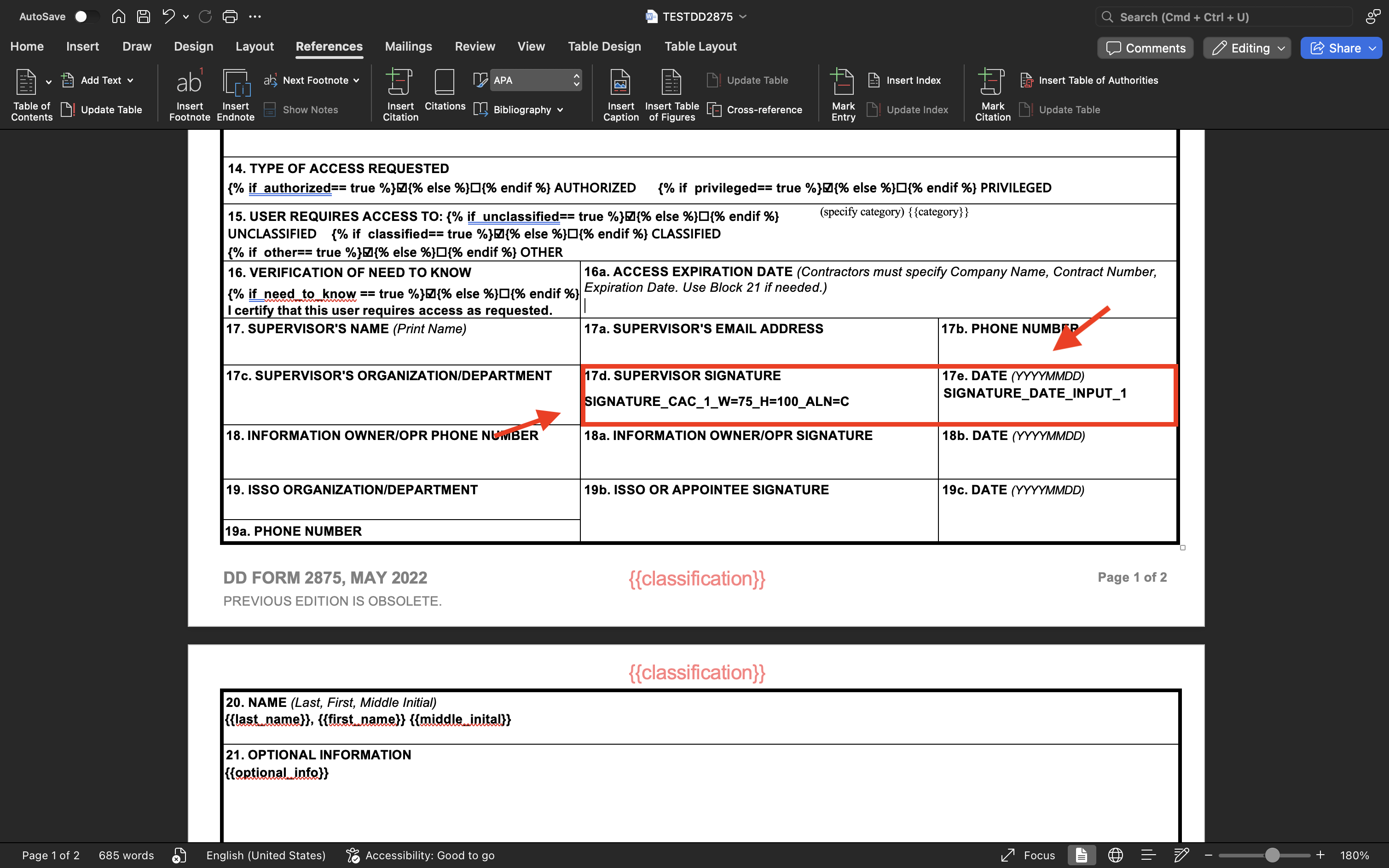
SIGNATURE_CAC_1_W=75_H=100_ALN=C SIGNATURE_DATE_INPUT_1 - *Signature**:
-
Save the template.
Updated about 1 year ago
Did this page help you?